
Rooms and jams
Public and private rooms, invites, scheduled jams, chat and recording.
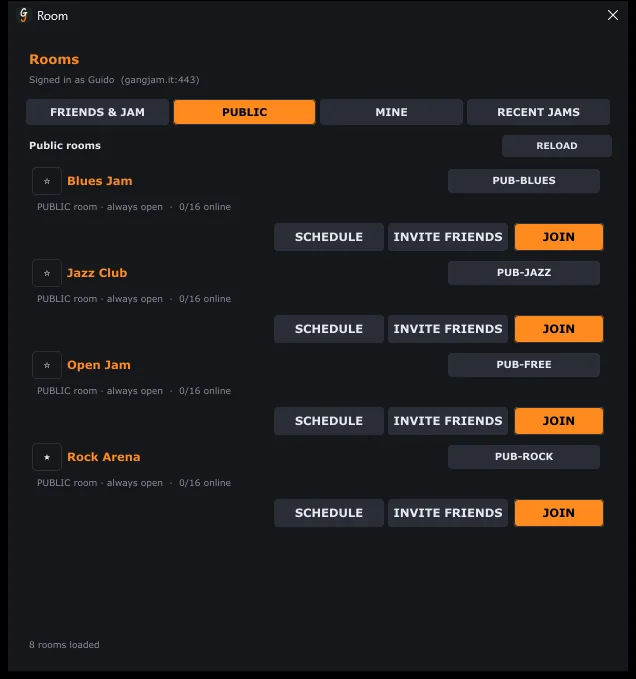
Finding a room
From CREATE / JOIN JAM (or the ROOM button):
- PUBLIC: themed rooms that are always open (Blues, Jazz, Rock, Open Jam): just press JOIN.
- MINE: your rooms. FRIENDS & JAM: your friends' rooms. RECENT JAMS: where you've played recently.
- Join with code: every room has a code (for example GJ-X4K9Y2); whoever receives it enters it here and presses REQUEST ACCESS.
Creating and managing a room
- In MINE, enter the name, the maximum number of people and how many days to keep the chat, then CREATE.
- INVITE FRIENDS sends the invite: your friend gets it as a notification and joins with one click. If they're offline they get it as soon as they connect, as long as someone is still in the room.
- In private rooms, anyone joining without an invite waits for approval from the organizer or a collaborator (Join request). Collaborators are appointed from MANAGE.
- SCHEDULE sets up a future jam: the guests receive an email with an event to add to their calendar.
During the jam
- CHAT opens the room chat inside the mixer: messages, images, audio and video (up to 15 MB). The dot on the button shows unread messages and who is typing.
- The globe at the top of the chat is the automatic translation: messages written in another language reach you in yours (the one chosen in Settings), a couple of seconds later and marked “translated”. Notes change notation too (an Italian’s La reaches you as A). Click a message to see the original; with the globe struck through, messages arrive as they were written. The translation is done by an artificial intelligence model, on GangJam’s servers or through Anthropic’s Claude service (see the privacy policy): a few words may come out wrong.
- TALK, at the bottom of the room chat, is the interpreter channel: in the menu next to it choose the input channel of your microphone, then hold TALK and speak. While you hold it the others don't hear you; when you release it they get the phrase written, in their language, in the chat and on the video, marked “spoken”, and they hear it in their headphones: your voice if they speak your language, otherwise the translation read by a synthetic voice. The small speaker next to a phrase you received plays it again. The speaker at the top of the chat turns listening to the phrases on and off (right click: volume). It works in rooms, at most 30 seconds per phrase; the voice is transcribed on GangJam's servers and deleted after a few minutes.
- The master’s REC records the jam: the others get a consent request, and whoever refuses is pointed out to whoever records.
- To leave the room, just join another one or close GangJam.
Can't find the answer? Press FEEDBACK in the app or write to us from the Contact page.