
The mixer
Strips, master, displays and console layers.
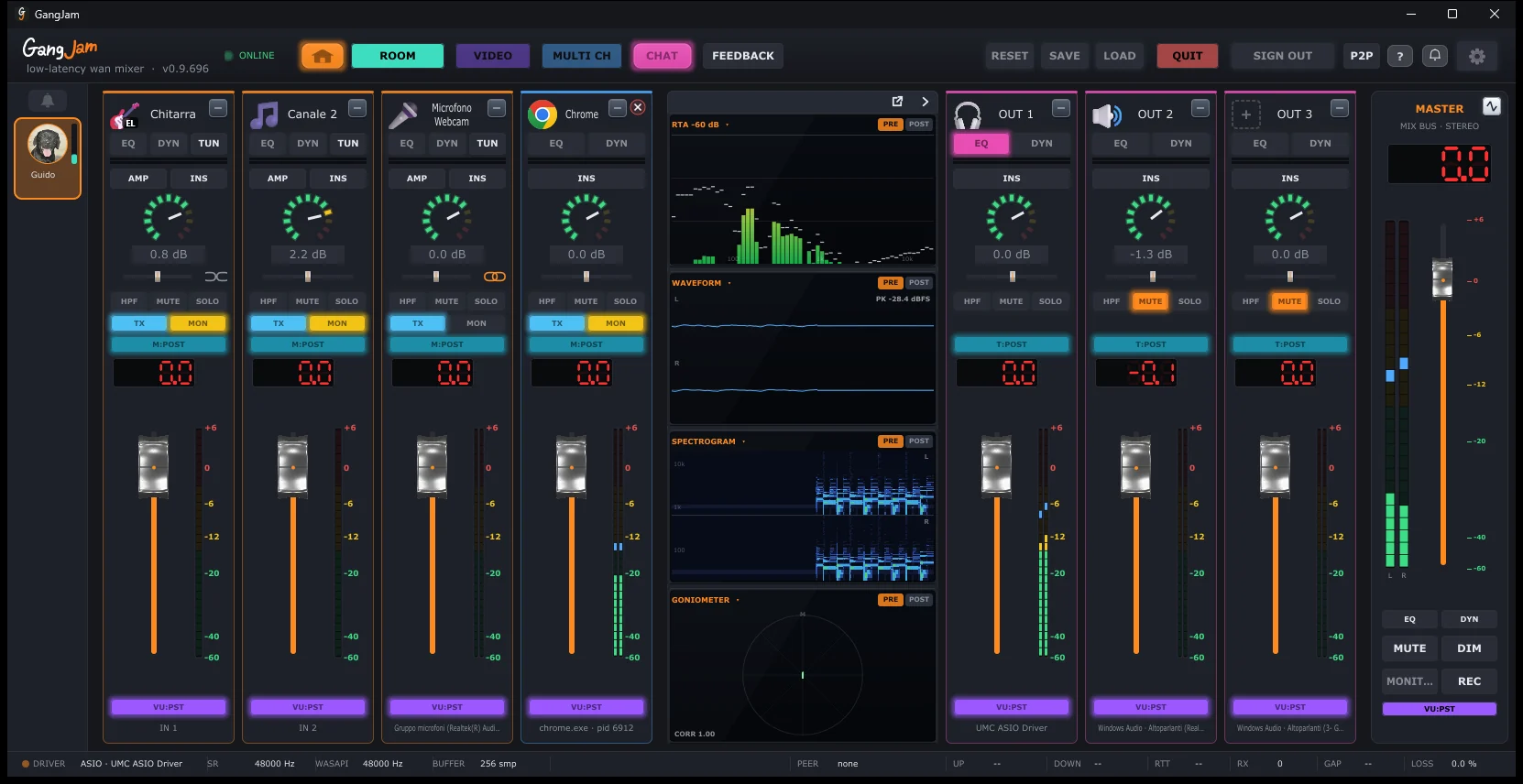
Rest the mouse for two seconds on a button or a control of the mixer: a short explanation of what it does appears.
A channel strip
From top to bottom:
- Name and icon: double-click the name to rename it; the icon shows what's connected.
- EQ: 4-band equalizer with spectrum analyzer (see Analyzers).
- DYN: gate and compressor.
- TUN: tuner (physical inputs only).
- AMP and INS: amp simulator and VST3 effects (see Effects).
- Knob: input gain in dB; below it, the pan: while you move it, it shows its value (from L100 to R100, 0 in the centre), and a double-click puts it back in the centre. On the physical inputs, next to the pan, the chain joins the channel to the next one in a single stereo strip (orange when they are joined; another click separates them). On stereo strips the pan becomes the balance: towards the right it turns the left side down, towards the left the right one.
- HPF, MUTE, SOLO: high-pass filter, mute, listen to this channel only.
- TX: this channel goes to the other musicians. MON: you hear it.
- M:POST / M:PRE: what you hear of this channel is taken after or before the fader; with M:PRE the fader does not change what you hear. The others always get the channel taken before the fader.
- On the OUT strips, T:POST / T:PRE chooses whether the output gets the mix after or before the master: with T:PRE the master’s fader, MUTE and DIM do not touch it.
- The application strips and the OUT strips also have HPF, EQ, DYN and INS (VST3 effects); on the OUT strips, SOLO lets only the outputs in SOLO play.
- Fader with its value in dB and the meter: let go of it close to 0 dB and it sets itself to exactly 0.0, and a double-click on the cap brings it back there; for an exact value, double-click the number and type it. VU:PST / VU:PRE chooses whether the meter reads after or before the fader.
The master
- Main fader, stereo meters, EQ and DYN for the mix.
- MUTE and DIM (lowers the volume without silencing it).
- MONITOR: the mix on the interface's outputs 3-4 as well.
- REC: records the jam to a WAV file, in the Documents\GangJam Recordings folder: the others as you hear them, plus what you send, also from the channels with MON off.
The top bar
- House icon: home screen. ROOM: rooms. VIDEO: video window. MULTI CH: multichannel or stereo. CHAT: room chat.
- FEEDBACK: sends a report with the logs to the developer.
- RESET, SAVE, LOAD: resets the mixer, saves and loads configurations.
- QUIT closes GangJam, SIGN OUT signs you out of your account, P2P opens the direct connection.
- The question mark opens this guide (also with the F1 key), the bell shows what's new and the gear opens Settings.
The other musicians
- In a room, each musician has their own column of strips, with their name. In multichannel their channels arrive separately, for you to mix however you like.
- The avatars are on the left: click an avatar to see only that musician's strips, click yours to go back to your own.
- SOLO on a musician's strip: you hear only them (and the other channels in SOLO) until you turn it off. It only changes what you hear: the others keep hearing you as before.
- The other musicians’ strips also have the gain, HPF, EQ, DYN and INS (VST3 effects): they change only what you hear, and GangJam remembers them for each musician.
- Above your avatar is the bell, to get the others' attention (see Notifications and the bell).
Layers and size
When the strips don't fit in the window, the mixer splits into layers like a console: the “CH a-b” and “OUT” buttons at the bottom left show one group at a time. The window remembers its position and size; the FIT button brings it back to the right size for your screen.
Can't find the answer? Press FEEDBACK in the app or write to us from the Contact page.