
Your smartphone as a camera (GangJam Cam)
Your phone as a second camera, a microphone and a jam monitor.
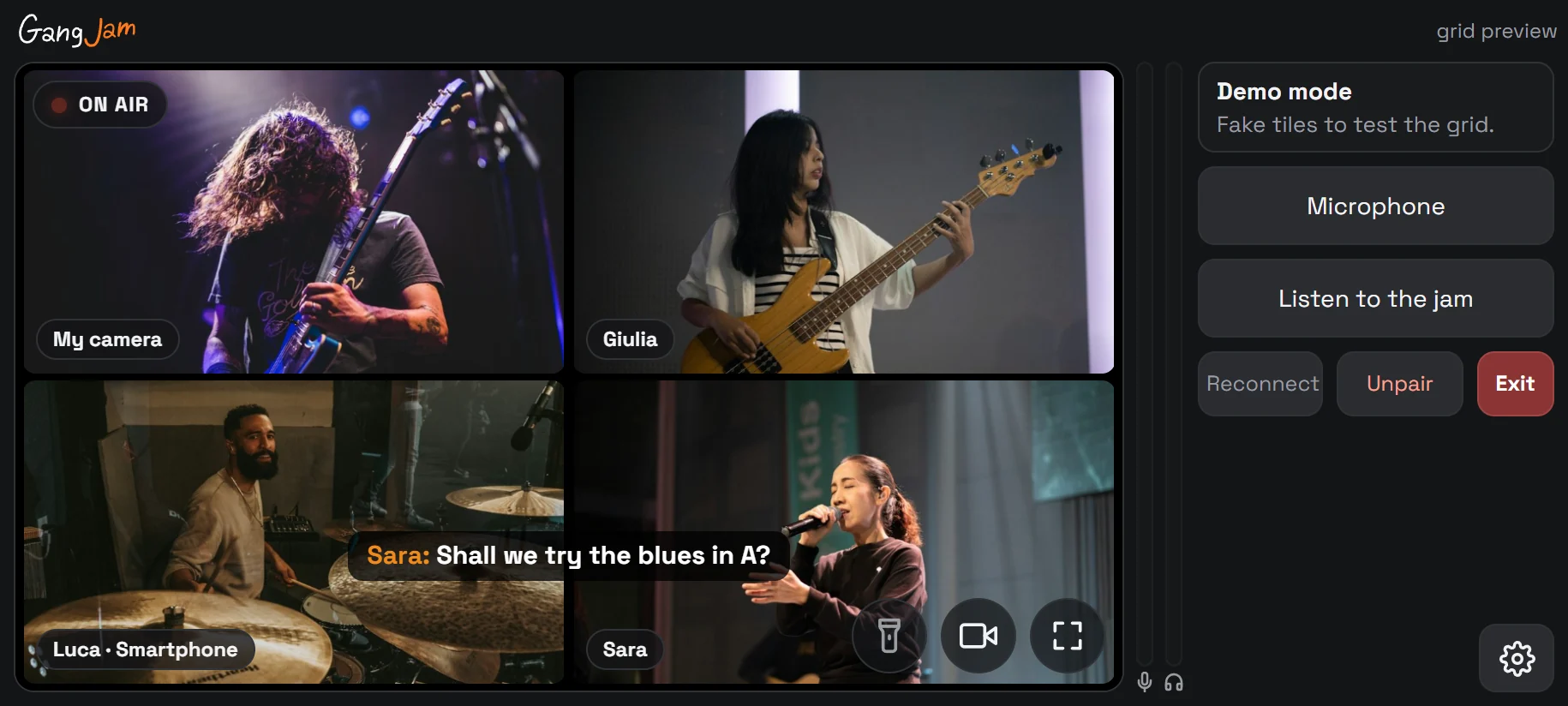
Pairing the phone
- In the video window press SMARTPHONE: a QR code and a code appear.
- Scan the QR code with your phone, or open gangjam.it/cam and enter the code. The phone stays paired with your account.
- From the phone's browser you can install the page as an app (“Install as app”).
What the phone does
- Camera: the phone joins the jam as an extra camera of yours (front or rear, with flashlight), seen by the others as “Name · Smartphone”.
- Microphone: the phone's microphone reaches the mixer as a “Name · Smartphone” strip (in rooms).
- Listen to the jam: the phone receives the mix from your PC, without its own microphone; hold down Microphone to talk (push-to-talk).
- The others: the grid shows the other musicians' videos and the room chat.
Page controls
- Camera button to turn it on or off, flashlight, full screen.
- The gear opens quality, mirror, rotation and technical details; Exit closes the page.
- The camera and the screen use as much battery as a video call: for long jams, keep the phone charging.
Can't find the answer? Press FEEDBACK in the app or write to us from the Contact page.